
CLI Reference
trimwire’s command tree is grouped into six areas. The new-user flow is:
trimwire install # wire trimwire into Claude Codesource ~/.zshrc # pick up ANTHROPIC_BASE_URL (or open a new terminal)trimwire doctor # verify the setupclaude # use Claude Code as normaltrimwire stats # see savings after your first sessionTab-completion is available for bash, zsh, fish, elvish, and PowerShell. See trimwire completions --help for per-shell one-liners.
LIFECYCLE
Section titled “LIFECYCLE”Commands to install, start, stop, and verify the gateway.
trimwire install
Section titled “trimwire install”Write a starter config, add the ANTHROPIC_BASE_URL env export (or BUN_OPTIONS, if [server] remote_control = true — see CONFIGURATION.md), and register the always-up service.
| Flag | Description |
|---|---|
--boot |
Enable lingering (systemd) so the service survives logout and starts before login |
--remote-control |
Wire Remote-Control coexistence mode: sets [server] remote_control = true for you (preloads the shim + leaves ANTHROPIC_BASE_URL unset), so Claude Code’s Remote Control works alongside pruning |
After install, source your shell rc (source ~/.zshrc or source ~/.bashrc) or open a new terminal to pick up the new env export, then run trimwire doctor to verify.
trimwire install # standard installtrimwire install --boot # also survive logout (systemd lingering)trimwire install --remote-control # opt into Remote-Control coexistencetrimwire uninstall
Section titled “trimwire uninstall”Remove the service, the GUI/login env hooks, and lingering that install set up. It does not edit your shell rc — the # >>> trimwire >>> block that exports ANTHROPIC_BASE_URL is left in place (rewriting a user’s rc is risky); the command prints a reminder to delete that block by hand and restart your shell.
trimwire on
Section titled “trimwire on”Fully engage trimwire. (Re-)adds the env exports to your shell rc (ANTHROPIC_BASE_URL, or BUN_OPTIONS in [server] remote_control coexistence mode) + the GUI/login env hook, (re)starts the gateway service, and enables pruning — undoing a prior trimwire off. Idempotent: if the path is already wired (the common case) it just makes sure the service is up and pruning is on. If it had to re-add the rc block, it tells you to source it (or open a new shell) so the current shell routes through trimwire too.
trimwire off
Section titled “trimwire off”Fully disengage trimwire. Stops the gateway and removes trimwire from the request path — strips the # >>> trimwire >>> export block from your shell rc and removes the GUI/login env hook — so Claude Code talks straight to api.anthropic.com. New shells and GUI apps go direct immediately; because a program can’t unset a variable in its parent shell, off prints the one line that fixes the current shell (unset ANTHROPIC_BASE_URL). Going direct re-enables host-gated Claude Code features — most notably Remote Control, which only runs on api.anthropic.com. Re-engage any time with trimwire on. (To keep Remote Control and pruning at once — without disengaging — enable the opt-in [server] remote_control coexistence mode instead; see CONFIGURATION.)
Just want to stop pruning for a bit without leaving the path? Use
trimwire pause/trimwire resumeinstead — they keep the gateway in place and don’t touch your rc.
trimwire pause / trimwire resume
Section titled “trimwire pause / trimwire resume”Pause pruning without leaving the path. trimwire pause flips a runtime sentinel (~/.trimwire/bypass) that the gateway reads per request: it keeps serving but forwards every request unmodified to Anthropic — in the current shell and every new shell/GUI app, with no env or rc edits. trimwire resume clears the sentinel and pruning resumes. Neither touches the service or the wiring (use trimwire on / off for that).
trimwire run [<claude args>…]
Section titled “trimwire run [<claude args>…]”Launch claude through a one-shot gateway, without installing the always-on service: trimwire starts the gateway in the background, points it at claude via ANTHROPIC_BASE_URL, runs claude, then tears the gateway down on exit. The command is always claude — any positional args are forwarded to it (so it’s trimwire run, not trimwire run claude). Good for trying trimwire once. --audit FILE (or TRIMWIRE_AUDIT=FILE) writes a metadata-only wire audit (JSONL — shape/counts only, never message content).
| Flag | Description |
|---|---|
--bypass |
Run this one session without trimwire: skip the gateway entirely and point claude straight at Anthropic (no pruning), while the always-on gateway keeps serving every other session. Handy for a quick apples-to-apples comparison or to sidestep pruning once without touching global state. |
trimwire run --bypass -- -p "one prompt, straight to Anthropic"trimwire run --bypass # interactive, no pruning, gateway untouchedtrimwire status
Section titled “trimwire status”Show whether the gateway is running and serving, plus a pruning: line — on, or OFF (bypass — forwarding unmodified) after trimwire pause.

trimwire doctor
Section titled “trimwire doctor”Diagnose the setup: config, active profile, gateway health, wiring (ANTHROPIC_BASE_URL, or BUN_OPTIONS + the shim in coexistence mode), ledger, and summarizer state. Run this first whenever something looks wrong.
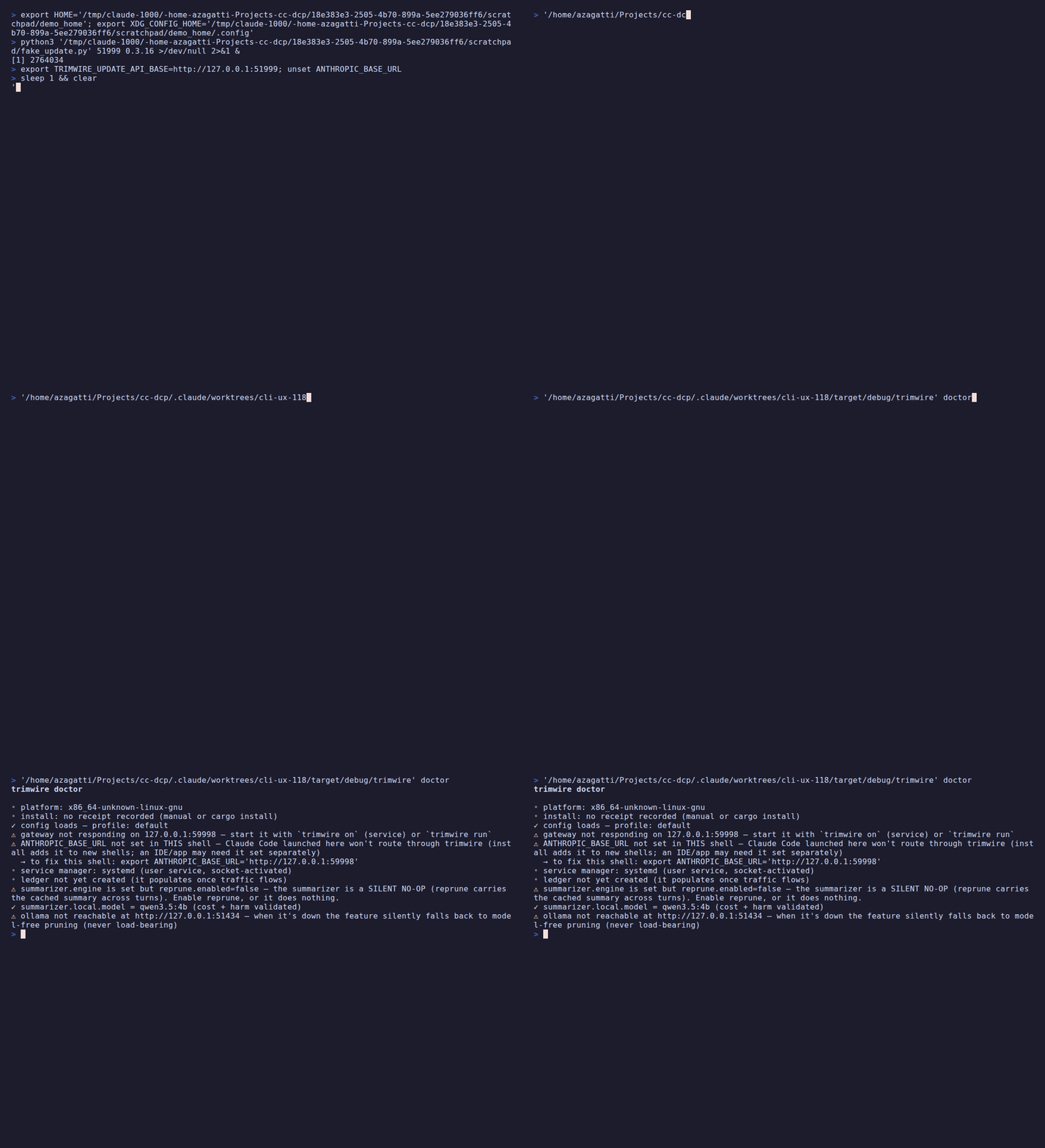
Immediately below the header, a platform: line reports the build platform — the target triple the binary was compiled for (e.g. platform: x86_64-unknown-linux-gnu) — which is useful in bug reports and identifies which release asset matches this binary.
The next line reports the install receipt — how trimwire was installed. The curl | sh installer writes $XDG_DATA_HOME/trimwire/install-receipt.json (default ~/.local/share/trimwire/install-receipt.json) with method: "script"; trimwire install refreshes it. A cargo/manual install has no receipt, so the line reads install: no receipt recorded (manual or cargo install) — that’s expected and harmless. (This metadata gates trimwire upgrade, which only self-updates a managed install — see trimwire update / trimwire upgrade.)
| Flag | Description |
|---|---|
--strict |
Exit 1 when trimwire is not installed yet, on advisory warnings (gateway not running / ANTHROPIC_BASE_URL unset or pointing elsewhere), and on hard failures — for CI / scripted health checks |
Exit-code contract:
- Exit 0 by default for advisory states (gateway not yet started,
ANTHROPIC_BASE_URLnot set in this shell). These are normal right after install while the service is warming up, sotrimwire doctor && claudeworks without failing. - Exit 1 on hard failures: a config that won’t load/parse, an unparseable listen address, or a disqualified summarizer model.
- With
--strict: exit 1 when trimwire is not installed yet, on any advisory warning, or on a hard failure — use this in CI health checks.
trimwire doctor # advisory warnings exit 0 (safe for post-install scripts)trimwire doctor --strict # any warning or failure exits 1 (CI health checks)trimwire update / trimwire upgrade
Section titled “trimwire update / trimwire upgrade”Two commands, mirroring apt update / apt upgrade: update is the read-only check; upgrade is the state-changing one. Every path that touches the binary is fail-closed: nothing is replaced unless the download’s SHA-256 and its minisign signature (verified against a key pinned in the binary) both pass. See SECURITY-MODEL.md for how releases are signed and verified.
trimwire update — read-only check; never downloads artifacts, never changes anything.
- Managed (
curl | sh) install: checks the latest GitHub release and reports whether a newer version is available (exit 0), pointing you attrimwire upgrade. cargo/manual install (or can’t confirm a managed install): prints the right update command for your method and exits 2 (it won’t touch a binary it didn’t place).- A failed network check (offline / rate-limited) is non-fatal: clear message, exit 0, no partial state.
- The old
update --dry-run/--apply/--yesare deprecated: they print a one-line redirect to the matchingupgradecommand and exit 2.
trimwire upgrade --dry-run — download the latest release for your platform and verify its checksum + signature without changing anything. Exit 0 = verified ✓; exit 1 = NOT verified (mismatch, missing/invalid signature, no pinned key, or network failure). Safe to run on any install. Verification-only, not staging: the download is verified in memory and nothing is cached to disk — a later trimwire upgrade performs its own fresh download + checksum + signature verification before applying (it never trusts a prior --dry-run).
trimwire upgrade — self-update. After the same verification it atomically replaces the binary and restarts the service, rolling back to the previous binary if the restarted gateway isn’t healthy. Linux + managed installs only. On a terminal it asks for [y/N] confirmation before downloading; pass --yes to skip the prompt (required for non-interactive use). Refuses (exit 2) on macOS/Windows, non-managed installs, non-writable locations, or a non-interactive shell without --yes. Never downgrades (only a strictly-newer release applies). Exit codes: 0 success/no-op, 1 verification failed or rolled back cleanly, 2 refused, 3 rollback failed (manual restore needed).
trimwire update # check only — never changes anythingtrimwire upgrade --dry-run # download + verify the latest release; change nothingtrimwire upgrade # verify, then replace + restart (asks first on a TTY)trimwire upgrade --yes # same, non-interactive (no prompt)Note: releases are signed (each archive ships a
.minisig), soupgradeworks on a managed Linux install today. Any older release cut before signing was enabled has no.minisig, soupgradefails closed against it — update via your install method instead; see the FAQ.
INSPECT
Section titled “INSPECT”Commands to view savings, browse sessions, and test pruning without network I/O.
trimwire stats
Section titled “trimwire stats”Show the savings ledger: bytes pruned, reduction %, estimated tokens, per-strategy breakdown, and cache health.
| Flag | Description |
|---|---|
--json |
Emit machine-readable JSON (bytes_saved, reduction_pct, est_tokens_removed, per_day, per_strategy, …) |
-q, --quiet |
One-line headline only — for scripts, prompts, and a quick glance |
-v, --verbose |
Full response instrumentation and a longer day history |
--session [ID] |
Per-session, per-model cache/token report. Omit the value (--session) to show the most recent session. Pass a session id from trimwire recall for a specific one. Conflicts with --since/--until |
--since YYYY-MM-DD |
Count only requests on/after this UTC date. Conflicts with --session |
--until YYYY-MM-DD |
Count only requests up to and including this UTC date. Conflicts with --session |
trimwire stats # summary: savings, reduction %, cache healthtrimwire stats -v # full instrumentation and longer day historytrimwire stats --session # most recent session detailtrimwire stats --session abc123 # a specific session from `trimwire recall`trimwire stats --since 2026-06-01 # savings since a datetrimwire stats --json | jq .reduction_pct # scriptingtrimwire recall
Section titled “trimwire recall”List recent sessions (content-free metadata: id, model, start time, request count) so you can find a session id to pass to stats --session.
Source:
recallreads trimwire’s ledger — sessions that actually ran through the gateway (so it’s empty until you’ve used trimwire withclaude). It does not read your on-disk~/.claude/projects/**.jsonltranscripts; inspecting or cleaning those is whatpreviewandsweepdo.
| Flag | Description |
|---|---|
[QUERY] |
Filter: keep sessions whose id or model contains this substring (positional, optional) |
--json |
Machine-readable JSON |
--limit N |
Max sessions to list, newest first (default: 20) |
--since YYYY-MM-DD |
Only sessions active on/after this UTC date |
--until YYYY-MM-DD |
Only sessions active up to and including this UTC date |
trimwire recall # 20 most recent sessionstrimwire recall sonnet # filter by model nametrimwire recall --since 2026-06-01 # sessions from a date windowtrimwire recall --limit 5 --json # scriptingtrimwire preview
Section titled “trimwire preview”What-if: estimate what pruning would trim from a recorded session transcript, without touching the file or the network. Safe to run on an active session.
| Flag | Description |
|---|---|
[PATH] |
Path to a Claude Code session transcript (~/.claude/projects/**/*.jsonl). Omit with --last |
--last |
Auto-pick the most recently modified session — no path needed. Conflicts with PATH |
--profile NAME |
Pruning profile to measure against (default or gentle; default: default) |
--include-sidechains |
Include sub-agent (isSidechain) turns — off by default since they are never part of the parent request’s messages[] |
--with-summarizer |
Also estimate the configured summarizer’s extra reduction on this session (off by default; the base preview is offline/instant). Directional, single-slice estimate |
--yes |
Confirm a real, paid API call when --with-summarizer uses an API engine. Without it, an API engine shows a cost preview and is skipped; local needs no confirmation |
--json |
Machine-readable JSON |
trimwire preview --last # most recent sessiontrimwire preview ~/.claude/projects/foo/bar.jsonl # a specific transcripttrimwire preview --last --profile gentle # compare against gentle profiletrimwire preview --last --with-summarizer # also estimate a local summarizertrimwire preview --last --with-summarizer --yes # ...incl. a paid API engine (real call)trimwire dashboard
Section titled “trimwire dashboard”Write a self-contained, content-free local stats dashboard to an HTML file. Open the file in any browser — no server needed.
| Flag | Description |
|---|---|
--out PATH |
Output path (default: trimwire-report.html in the current directory) |
trimwire dashboard # writes trimwire-report.htmltrimwire dashboard --out ~/tmp/report.html # custom pathSUMMARIZER
Section titled “SUMMARIZER”Manage the optional model-based summarizer backend. Off by default — engine = "model-free". See Summarizer for full setup and privacy details.
trimwire summarizer setup
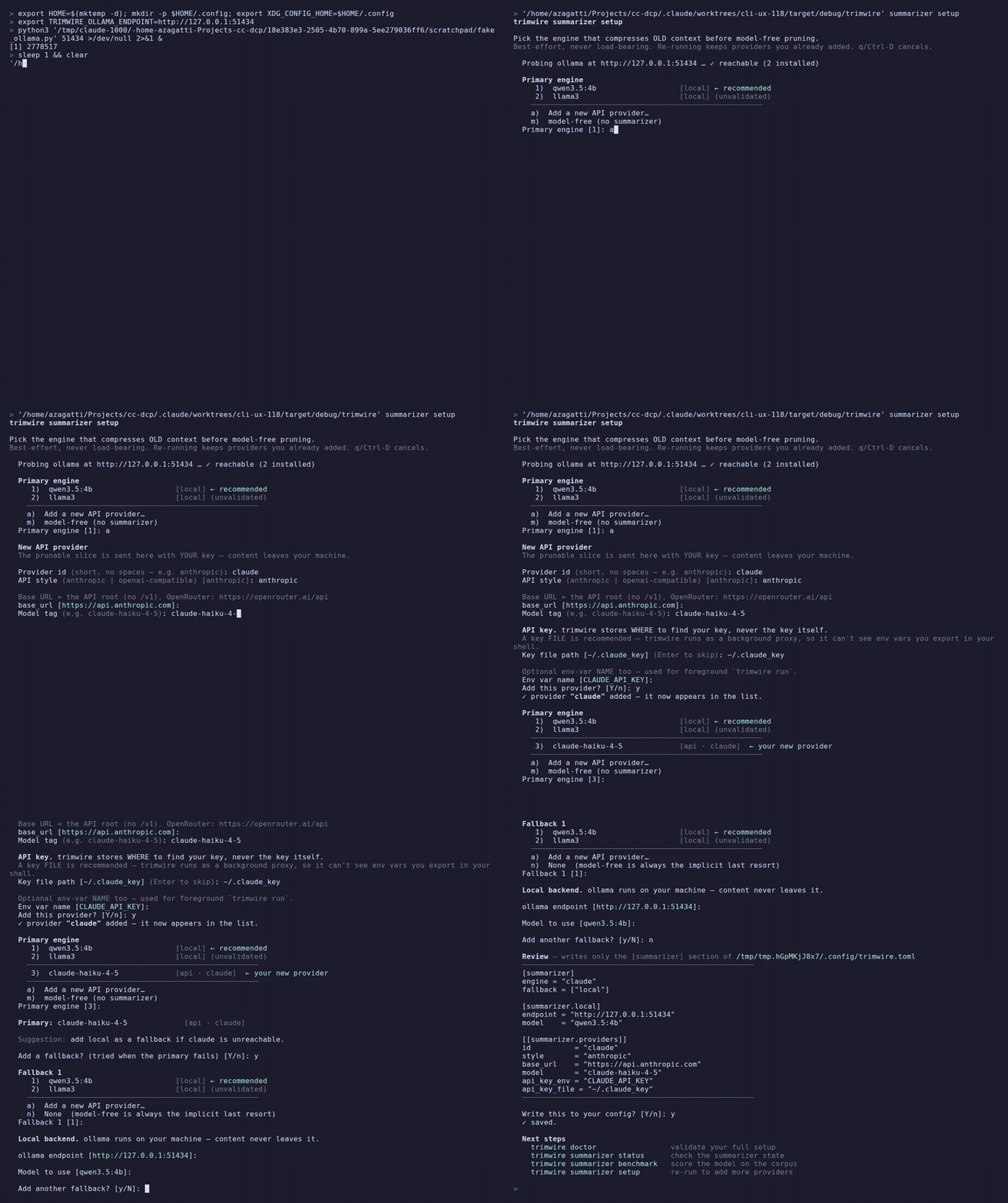
Section titled “trimwire summarizer setup”Interactive wizard: asks which engine (local, a cloud API provider, or model-free), which model, and (for API engines) which API-key environment variable, then writes the config block. It highlights the recommended choice, marks a provider you just added, and previews the exact config before writing.
trimwire summarizer status
Section titled “trimwire summarizer status”Show the current summarizer engine, model, and whether the endpoint is reachable.

trimwire summarizer benchmark
Section titled “trimwire summarizer benchmark”Score a summarizer model against the bundled quality corpus. A directional sanity-check — not an authoritative ranking. See Benchmark a local model for full guidance.
Local ollama models score directly. An API provider (a --model matching a configured [[summarizer.providers]] id) makes real, paid API calls on your key, so it only runs with --yes; without it you get a dry-run cost preview.
| Flag | Description |
|---|---|
--model TAG_OR_ID |
Model to score (repeatable): a local ollama tag, or a configured API provider id. Omit to use your configured model |
--all-installed |
Score every model installed in ollama (disqualified ones are skipped) |
--out DIR |
Directory to save each produced summary (skim them — scores cannot judge prose) |
--json |
Machine-readable JSON |
-q, --quiet |
One line per model (model + score) |
--yes |
Confirm real, paid API calls for an API provider. Local models ignore this; without it an API provider is a dry run |
--max-calls N |
Cap how many corpus slices an API provider is scored on. Spend control for paid providers; local models ignore it |
trimwire summarizer benchmark # configured modeltrimwire summarizer benchmark --model qwen3.5:4b # a specific local modeltrimwire summarizer benchmark --all-installed # every installed ollama modeltrimwire summarizer benchmark --model anthropic # dry run (cost preview)trimwire summarizer benchmark --model anthropic --yes # real paid calls on your keytrimwire summarizer probe
Section titled “trimwire summarizer probe”Slice-ceiling fact gate: plant distinctive facts across a synthetic OLD slice at your slice_char_budget (or --bytes), summarize it with your model, and report fact retention by position (start/mid/end). Exits non-zero below 90%. The installed-user counterpart of the api_harm example — validate your model at your budget before trusting large-budget summaries.
| Flag | Description |
|---|---|
--model TAG_OR_ID |
Model to probe: a configured provider id, local, or a local ollama tag. Omit to use your configured engine |
--bytes N |
Slice budget in bytes (default: the engine’s effective slice_char_budget) |
--runs N |
Repeat N times and report the retention distribution (pass-rate / p50 / min). Model summaries are non-deterministic, so a single run near the 90% gate is unreliable. PASS requires ALL N runs ≥90%. For an API provider, cost scales with N |
--concurrency K |
Fire up to K of the --runs in PARALLEL (API only; the local engine is forced serial — one model). Speeds up a big sweep; mind provider rate limits |
--yes |
Confirm real, paid API call(s) when probing an API provider; without it you get a dry-run notice. Local models ignore it |
trimwire summarizer probe --model qwen3.5:4b --runs 3 # local, default budget, 3 runstrimwire summarizer probe --model qwen3.5:4b --bytes 60000trimwire summarizer probe --model openrouter --runs 10 --concurrency 5 --yes # 10 paid calls, 5 at a timeSingle-run rankings are unreliable for non-deterministic models — --runs 5+ is the honest way to tell whether your model holds your budget. See Model compatibility.
Opt-in anonymous telemetry uploads to the community dashboard. Everything is a dry run until you share enable (or pass --yes once). Content-free — no prompts, code, or session text. See Telemetry for the exact payload.
trimwire share enable
Section titled “trimwire share enable”Opt in: persist consent so future share stats runs upload without --yes.
trimwire share disable
Section titled “trimwire share disable”Opt out: stop uploading. Reverses share enable.
trimwire share stats
Section titled “trimwire share stats”Upload an anonymous, content-free aggregate of your ledger to the community dashboard. Dry run until you share enable (or pass --yes).
| Flag | Description |
|---|---|
--yes |
Confirm the upload for this run (one-off; does not persist consent) |
--force |
Bypass the once-per-day throttle. Does not bypass consent |
trimwire share stats # dry run (shows payload, sends nothing)trimwire share stats --yes # one-off upload (does not persist consent)trimwire share enable # persist consent — future runs upload automaticallytrimwire share stats --force # re-upload today (bypasses the daily throttle)trimwire share benchmark
Section titled “trimwire share benchmark”Score your summarizer model and upload the anonymous, content-free per-model result to the community benchmark leaderboard. Dry run unless --yes. The model is scored on a bundled synthetic corpus — never your session content.
| Flag | Description |
|---|---|
--model TAG_OR_ID |
Model tag to score (repeatable). Omit to use your configured summarizer model |
--all-installed |
Score every model installed in ollama (disqualified ones are skipped) |
--yes |
Confirm the upload (without it, this is a dry run) |
trimwire share benchmark # dry run (prints the row)trimwire share benchmark --model qwen3.5:4b --yes # score + uploadMAINTENANCE
Section titled “MAINTENANCE”Commands to manage on-disk session transcripts and config.
trimwire sweep
Section titled “trimwire sweep”Clean Claude Code session transcripts on disk. Atomic (backed up before any write). Safe to run; active sessions abort cleanly and leave the file untouched.
Subcommands:
trimwire sweep list
Section titled “trimwire sweep list”List all session transcripts trimwire can find (no need to locate paths manually).

trimwire sweep all
Section titled “trimwire sweep all”Clean every discovered session. Active ones safely abort (file untouched).
| Flag | Description |
|---|---|
--dry-run |
Report what would change without writing anything |
--yes |
Skip the confirmation prompt (required in non-interactive use) |
trimwire sweep all --dry-run # preview without writingtrimwire sweep all --yes # run without prompting (scripting)trimwire sweep file
Section titled “trimwire sweep file”Clean a single session file by path.
| Flag | Description |
|---|---|
PATH |
Path to the session .jsonl file (required positional) |
--dry-run |
Report what would change without writing anything |
--validate-only |
Only validate the file format; do not modify it. Conflicts with --dry-run |
trimwire sweep file ~/.claude/projects/foo/bar.jsonltrimwire sweep file ~/.claude/projects/foo/bar.jsonl --dry-runtrimwire sweep undo
Section titled “trimwire sweep undo”Restore a session from its latest backup (the .bak.<timestamp> file written by a previous sweep).
| Flag | Description |
|---|---|
PATH |
Path to the session .jsonl file to restore (required positional) |
trimwire sweep undo ~/.claude/projects/foo/bar.jsonltrimwire config
Section titled “trimwire config”With no subcommand (or edit): open ~/.config/trimwire.toml in $EDITOR.
Subcommands:
trimwire config show
Section titled “trimwire config show”Print the effective resolved config — after the profile + global/project/env merge.
| Flag | Description |
|---|---|
--json |
Emit JSON instead of TOML |
trimwire config show # resolved TOMLtrimwire config show --json # resolved JSON (scripting)trimwire config edit
Section titled “trimwire config edit”Open ~/.config/trimwire.toml in $EDITOR. Same as running trimwire config with no subcommand.
Commands for shell integration: statusline, tab-completion, and man pages.
trimwire statusline
Section titled “trimwire statusline”Manage trimwire’s Claude Code statusline bar. The statusline shows live gateway + savings data inside the Claude Code terminal.
Subcommands:
| Subcommand | Description |
|---|---|
add |
Make trimwire your Claude Code statusline (errors if you already have one — use wrap instead) |
wrap |
Keep your existing statusline and add a trimwire row beneath it (reversible) |
remove |
Remove trimwire from the statusline (restores any wrapped original) |
trimwire statusline add # set as statusline (fresh install)trimwire statusline wrap # add beneath an existing statuslinetrimwire statusline remove # remove and restore originaltrimwire hook
Section titled “trimwire hook”Claude Code hook that warns in-session when trimwire is configured (ANTHROPIC_BASE_URL points at it) but not actually serving. Wire it as a SessionStart (and/or UserPromptSubmit) hook in ~/.claude/settings.json — it stays silent when the gateway is healthy and emits a visible systemMessage only when something is wrong. It never blocks the prompt.
Reads Claude Code hook JSON on stdin and emits JSON with a systemMessage key if the gateway is down. Exits 0 in all cases. If run interactively (stdin is a terminal), it prints a usage note and exits immediately instead of blocking.
{ "hooks": { "SessionStart": [{ "hooks": [{ "type": "command", "command": "trimwire hook" }] }] }}See CONFIGURATION.md for the full hook wiring example.
trimwire completions
Section titled “trimwire completions”Print a shell completion script to stdout. Pipe or redirect it to your shell’s standard location — one-time setup, then restart your shell.
| Argument | Description |
|---|---|
SHELL |
Target shell: bash, zsh, fish, elvish, powershell (required positional) |
# bashtrimwire completions bash > ~/.local/share/bash-completion/completions/trimwire
# zsh — simplest: eval inline (add to ~/.zshrc, then restart shell)echo 'eval "$(trimwire completions zsh)"' >> ~/.zshrc# or write to a file on $fpath:trimwire completions zsh > ~/.zfunc/_trimwire# (requires: fpath=(~/.zfunc $fpath) and autoload -Uz compinit in ~/.zshrc)
# fish — drop into the completions dir, fish picks it up automaticallytrimwire completions fish > ~/.config/fish/completions/trimwire.fish
# powershell — append to your profile so it loads each sessiontrimwire completions powershell >> $PROFILE
# elvish — source inline from your rcecho 'eval (trimwire completions elvish | slurp)' >> ~/.config/elvish/rc.elv
trimwire man
Section titled “trimwire man”Generate man pages. With no --out, prints the top-level page to stdout. With --out, writes one page per command (for packagers).
| Flag | Description |
|---|---|
--out DIR |
Directory to write the generated man pages into (for packagers) |
trimwire man | man -l - # browse in mantrimwire man --out ./man/ # write all pages for packagingEnvironment variables
Section titled “Environment variables”| Variable | Description |
|---|---|
ANTHROPIC_BASE_URL |
Points Claude Code at the trimwire gateway (the default wiring). Set automatically by trimwire install; unset it to send Claude Code straight to Anthropic. You rarely need to touch it: trimwire off fully disengages (stops the gateway and removes this export), trimwire pause keeps the var valid but forwards unmodified, and trimwire run --bypass overrides it for a single session. Deliberately left unset in Remote-Control coexistence mode (see BUN_OPTIONS). |
BUN_OPTIONS |
Set instead of ANTHROPIC_BASE_URL when [server] remote_control = true — trimwire install/on write --preload ~/.trimwire/coexist-shim.js, preloading the coexistence shim into Claude Code’s Bun runtime so /v1/messages still routes through the gateway while Remote Control keeps working. See CONFIGURATION.md. |
TRIMWIRE_LOG |
Log verbosity for the gateway: warn (default), info, debug. Logs go to stderr. Example: TRIMWIRE_LOG=info trimwire run (the foreground gateway picks up the env). |
TRIMWIRE_AUDIT |
Opt-in metadata-only wire audit: append one JSONL line per request describing its shape (counts/flags + cache-prefix structure, never content) to <file>. Same as --audit <file>. See CONFIGURATION.md. Off when unset |
Configuration reference: trimwire config show. Setup diagnosis: trimwire doctor. Troubleshooting: Troubleshooting.